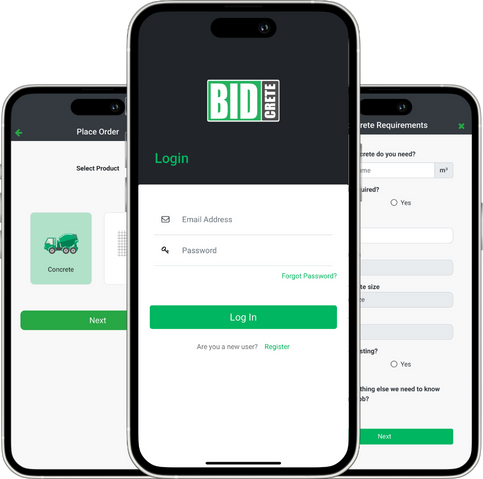
If you are flat out on a build and need concrete delivered without the usual runaround, you have landed in the right place. Ordering concrete used to mean chasing quotes, waiting on hold, and hoping the truck shows up on time. With the BidCrete app, this guide breaks down how to order concrete using our mobile platform, built for Australian Tradies on the East Coast – currently in Brisbane and Sydney. Whether it’s a small driveway or a large slab we will manage your pour from start to finish.
Why Use BidCrete for Your Concrete Orders?
Let’s cut to the chase. As a concreter, builder or part of the industry your time is valuable and holding costs are high. BidCrete connects you with Australia’s top concrete suppliers, offering fair prices, flexible pour times, and real-time updates. We provide a reliable service to keep your site on schedule. We’ve managed over 10,000 concrete pours, so you know we’re the real deal.
Step 1: Download and Set Up the App
First up, download the BidCrete app from the App Store or Google Play. It’s free, quick to install, and works on your phone or tablet. Sign up with your details – you’ll need your ABN and some information about your business to get verified. Takes less than five minutes, and you’re good to go.
Pro tip: Sync your account to your desktop for when you’re back to the office so you can access the App on your browser.
Step 2: Punch in Your Project Details
Open the app and tap ‘New Order’. Here’s where you outline the basics:
- Job Location: Type the address which will auto fill. We cover the East Coast, including NSW Metro and Suburbs plus South East Queensland and Northern Rivers.
- Pour Time and Date: Our team are talking to concrete suppliers from 5.30am to 5.00 pm 5.5 days a week. We find times that suit you and we often pick up cancellations by being on the spot.
- Concrete Specs: Pick your mix – we cover standard, exposed, coloured and most other mixes including fibre crete, TMR and more. Add the volume in m³, slump, and any additives.
It’s dead simple – no tech degree required. Just tap and go, like ordering a coffee.
Step 3: Get Quotes and Pick Your Supplier
Once your details are in, BidCrete pings our network of trusted suppliers. You’ll get quotes rolling in straight to your app – clear pricing, no hidden extras and all T’s and C’s included. Compare side-by-side: rates per m³, delivery costs, and supplier details. Pick the one that fits your budget and schedule. We prioritise local suppliers to keep costs low and support Aussie businesses.
Step 4: Confirm and Track Your Order
Hit Accept ’ and you’re locked in. Pay securely through the app – credit card, invoice, or account for regulars. Track everything in real-time: supplier confirmations, truck ETA, and digital dockets for your records. If plans change, chat directly via the App or call, and our team will manage the rest.
Step 5: Pour Day and Beyond
On pour day, our team will have already reconfirmed with you and any last minute issues on the day are managed by us. After the job, rate the supplier to help other tradies. Got an issue? Our support team’s a chat away.
There you go – how to order concrete made easy with BidCrete. No more wasting half your day on logistics. Ready to give it a go? Download the app today and place your first order.
Any Questions? Let us know – we’re here to make your life easier on site.